
AI-BSP-PX1000 — AI-Powered Intelligent Storage & Retrieval Software
Smart digital document repository powered by artificial intelligence · On-Premise Edition
⚠️ The challenge
| Challenge |
|---|
| Large, scattered data: scanned records, photos, meeting recordings and video footage spread across individual computers, hard drives and shared folders. |
| Slow manual lookup: finding one piece of information means opening file after file, replaying recordings and scrubbing through videos. |
| Internet AI is not an option: sensitive data cannot leave the organization, while manual data entry is costly. |
| Weak access control: hard to know who viewed, edited or deleted which document, and when. |
💡 The solution
AI-BSP-PX1000 is a next-generation digital repository that uses artificial intelligence to automatically understand the content of documents, images, recordings and videos and make it quick to search. Unlike traditional repositories that simply store files, it understands content as soon as it is ingested, so searches return the exact passage you need — the right page of a document or the right moment in a recording or video — instead of a list of files to open one by one.

- Centralize all documents in one unified, well-structured digital repository.
- Automatically turn images, scans, recordings and videos into searchable content.
- Search information quickly and open the exact page or moment in the original file.
- Share with control — the right people, the right scope.
- All AI runs inside your own infrastructure — data never leaves the system.
⭐ Key benefits
| Benefit | Description |
|---|---|
| Faster audio/video search | Find information by spoken content or event context — no more manual listening. |
| Source-cited results | Precise timestamps (audio/video) or page references (documents) for verification. |
| Put dormant data to use | Recordings, videos and photos become searchable information. |
| 100% on-premises | Aligned with internal data requirements and security policies. |
| Standardized governance | Centralized management by folder, topic, document type and sharing group. |
📂 Supported data
| Documents | Images | Video | Audio |
|---|---|---|---|
| PDF, DOCX… | JPG, PNG… | MP4, AVI… | MP3, WAV… |
Originals are stored as-is; the list of allowed upload formats is configured by the administrator.
System outputs: Text recognized from images/documents · Timestamped transcripts · Image descriptions · Video summaries · Search results linked to the original location.
🚀 Key features
1. Automatic AI digitization
Once uploaded, documents are processed by AI automatically in the background — no waiting required:
| Processing | Applies to | Output |
|---|---|---|
| Text recognition (OCR) | Images, PDF | Extracts Vietnamese text page by page, with text positions on the original page. |
| Image content analysis | Images | Describes the main content of an image in Vietnamese — images without text become searchable by content. The system does not identify people. |
| Speech-to-text (STT) | Audio, video | Turns speech into text with timestamps for playback from the right point. |
| Video summarization | Video | Summarizes the video overall and segment by segment; click a segment to play from that point. |
2. Human review, AI assistance
AI results are always checked by the document owner before entering the official search index:
- A personal review queue showing processing status.
- View the original page next to the recognized text; listen to audio synchronized with each sentence; watch the video next to its summary.
- Edit content directly, with edit history.
- Results left unreviewed are auto-confirmed after a period configured by the administrator.
3. Smart search
- Keyword search across all digitized content: text in images and PDFs, image descriptions, speech in recordings and videos, video summaries and notes.
- Search by meaning (semantic search): ask questions in plain Vietnamese without needing the exact keywords; the system understands what you mean and returns relevant passages with sources cited so users can verify against the original.
- Result positioning: click a result to open the right page or play the right segment of an audio/video file.
- Advanced filters by document type, label, time, folder and group.
- Results are automatically limited to the searcher’s access scope.
4. Fast, safe ingestion
- Upload many files at once or drag and drop multiple folders (including subfolders) in one go.
- Large-file support.
- Every file goes through safety checks (integrity, malware, format) before entering the digital repository.
- Add notes at upload time; ingest from computers, USB drives, DVD/CD and more.
5. Digital repository management and classification
- The digital repository is organized as an administrator-defined folder tree.
- Labels by topic and document type; filter and analyze by label.
- Document notes with edit history, fully searchable.
- Safe deletion via recycle bin: restore to the original location; automatic permanent deletion after a set retention period.
6. Teamwork and controlled sharing
- Create groups, invite members, assign owner / member roles.
- Share documents into groups — individually or in bulk — by link, without copying files.
- In-app notifications for newly shared documents and membership changes.
- Each user only sees documents they uploaded or that were shared into their groups.
7. Statistical reports and export
Pick a ready-made template, filter by reporting period, group, folder, topic and document type, and view results on screen:
| Report template | Content |
|---|---|
| Digital repository status by period | Document counts and storage by period and file type, with trend charts. |
| Digitization progress and quality | Status of processing, review and confirmation of digitization results. |
| Statistics by topic and document type | Document counts by topic, document type and unclassified documents. |
- Export to PDF, Excel, Word for printing or sharing.
- Save frequently used filters to quickly re-run reports.
- Reports only count documents the creator is allowed to see.
8. Personal storage
- Each user has a personal storage space, invisible to others, within an assigned quota.
- Move personal files or folders into the digital repository when they need to be shared or used (they are then digitized as usual).
9. Integration with other systems
- Standard APIs let other business applications on the internal network access data; an open architecture ready to integrate with other systems.
- Administrators grant / revoke API access, limit data scope and monitor usage.
🧭 Typical use cases
| Use case | Value |
|---|---|
| Meetings and working sessions | Quickly find statements by topic and get the exact timestamp. |
| Citizen reception / hotline | Locate conversations by complaint or request content. |
| Field / incident monitoring | Pinpoint video segments containing specific events via per-segment summaries. |
| Inspection and audit | Semantic search across large datasets with source-cited results. |
🛡️ Security and safety
| Principle | Description |
|---|---|
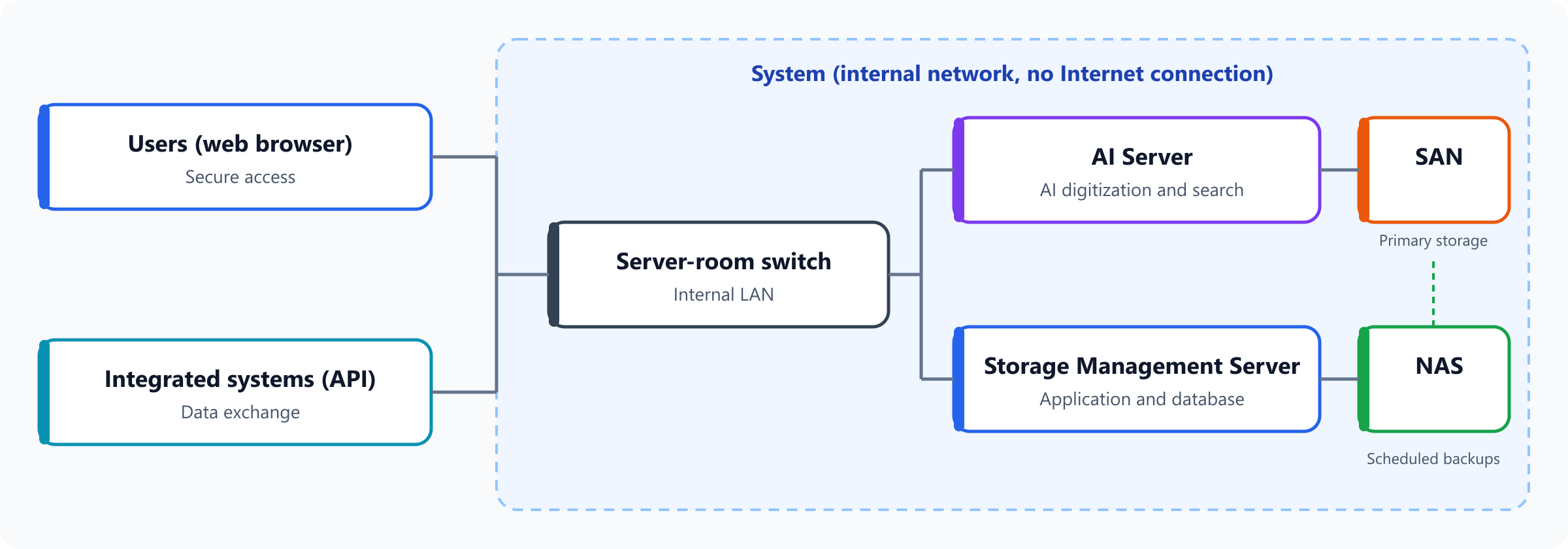
| Fully on-premises | The system and its AI models run inside your infrastructure and can operate on an isolated network with no Internet connection. Data is never sent outside. |
| Access limited to assigned scope | Users only see data within their permitted scope — consistently across search, reports and APIs. |
| Separation of duties | Administrators operate the system but cannot read business document content. |
| Role-based permissions | Administrators assign permissions by role; the interface adapts automatically. |
| Data integrity | Originals are protected and cannot be altered after being uploaded to the digital repository. |
| Full traceability | Every action is logged for inspection and oversight. |
| Account and transport protection | Encrypted connections; accounts protected against unauthorized access. |
| Backup and recovery | Scheduled backups of data and configuration; recovery when incidents occur. |
👤 User roles
| Role | Main functions |
|---|---|
| Officer | Uploads documents, reviews digitization results, classifies, annotates, searches, shares and creates reports. |
| Manager | All officer functions, plus activity-log monitoring within the groups they manage. |
| System administrator | Manages accounts, permissions, digital repository folder structure, configuration, file formats, ownership transfer, API keys and logs — no access to business content. |
| Integrated system | Accesses data through the API with an issued key, within its permitted scope. |
🏗️ Architecture and deployment
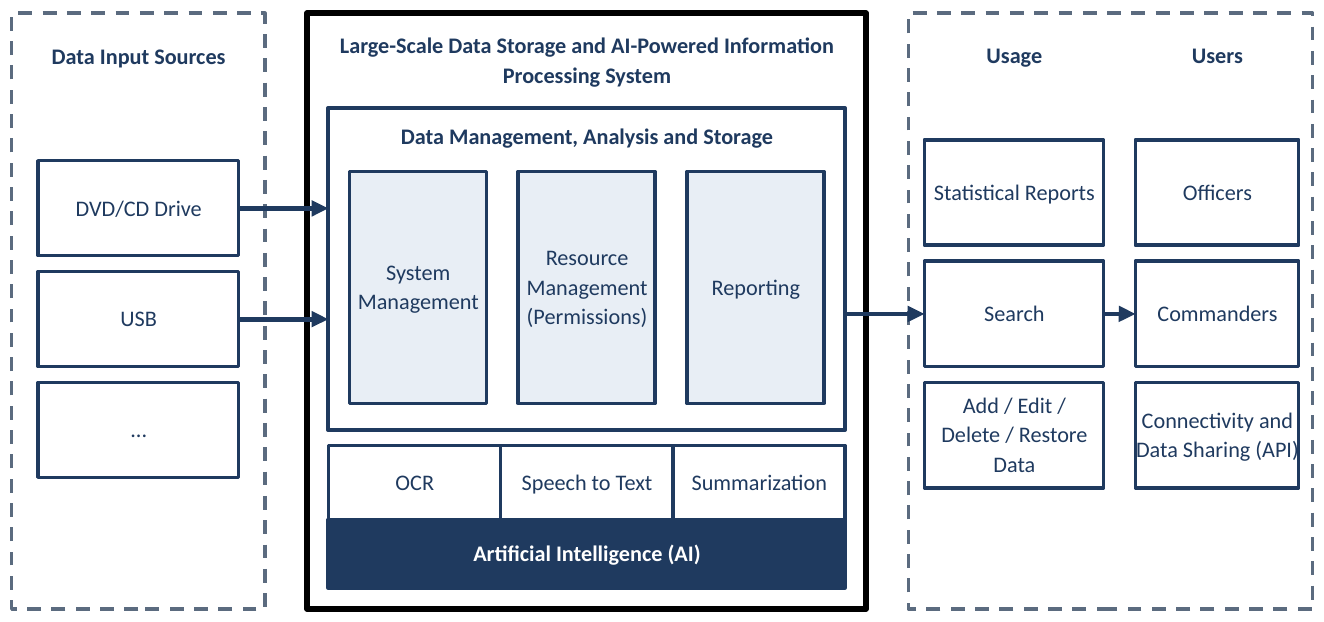
Layer diagram: data input → management, storage and AI processing → usage (search, reports) → users and integrated systems.
Built-in AI models
All AI models are installed and run entirely on the system’s AI server, with no Internet connection required.
| Function | Model size |
|---|---|
| Text recognition (OCR) | Text recognition model of about 1.1 billion parameters |
| Speech-to-text | Speech recognition model of about 1.5 billion parameters, combined with a speech segmentation model |
| Image description, video summarization | Multimodal models (understanding both images and language) in 2, 4 and 7 billion parameter sizes |
Model sizes are chosen to match each organization’s hardware configuration and performance requirements.
Proposed hardware configuration
| Device | Specifications |
|---|---|
| AI Server | Processor: Intel® Xeon® 6 Performance 6530P 2.3G, 32C/64T, 24GT/s, 144M Cache, Turbo, (225W) DDR5-6400 or equivalent/better RAM: ≥ 128GB GPU: ≥ 2 × 24GB Storage: ≥ 2 × 3.84TB NVMe |
| Storage Management Server | Processor: 2 × Intel® Xeon® 6 Performance 6527P 3.0G, 24C/48T, 24GT/s, 144M Cache, Turbo, (255W) DDR5-6400 or equivalent/better RAM: ≥ 128GB Storage: ≥ 2 × 3.84TB NVMe |
| SAN Storage System | Controller: 25Gb iSCSI 8 Port Dual Controller, ME52xx 5U or better Drives in enclosure: 20 × 16TB 3.5″ SAS 12Gbps 7.2K and 8 × 7.68TB SSD SAS 24Gbps or equivalent/more |
| Backup Appliance (NAS) | Processor: Intel Xeon E-2378 8C 16T 2.6GHz or equivalent/better RAM: ≥ 64GB Storage capacity: ≥ 144TB HDD (6 × 24TB drives or equivalent) |
This is a proposed configuration for a typical deployment. Actual hardware may change according to performance requirements and the data volume of each organization.
Scalability
- Designed for large repositories that keep growing over time.
- Digitization runs in the background without affecting users’ work.
- Processing power and storage capacity can be expanded by adding hardware.
🏆 Benefits
- Save time: digitized data makes finding information fast and convenient.
- Unlock dormant data: recordings, videos and photos become searchable sources.
- Tight control: know exactly who can see what, and who did what, when.
- Peace of mind: modern AI while data never leaves the organization.
- Ready to grow: open architecture that connects with other business systems.
- User-friendly: Vietnamese interface designed for non-technical users.
🎯 Ideal for
- Government agencies and organizations that need to digitize and manage large document repositories.
- Units holding large volumes of minutes, meeting recordings and multimedia materials.
- Organizations with strict security requirements that must run AI on their internal network.